
Badseed Tech Carpio Review: Is It Really Worth Buying?
Why the Badseed Tech Carpio Review Is Getting So Much Attention
If long hours at your computer leave your wrist feeling tired or uncomfortable, you’re not alone. The Badseed Tech Carpio review has sparked interest because it examines whether the DeltaHub Carpio 2.0 offers a genuine ergonomic advantage over traditional wrist rests. Instead of relying on a fixed cushion, it moves naturally with your hand to support smoother mouse movement and reduce wrist pressure.
In this Badseed Tech Carpio review, you’ll discover how the wrist rest performs in real-world use, its key strengths and drawbacks, who should consider buying it, and whether it’s worth the investment. You’ll also find practical ergonomic tips, sizing advice, and buying insights that many reviews fail to cover, helping you make a confident purchasing decision.
Who Is BadSeed Tech and Why Do People Trust His Reviews?
BadSeed Tech is known for reviewing gaming accessories, PC peripherals, desk setups, and ergonomic products with a practical, experience-based approach. Instead of relying only on manufacturer specifications, the channel typically evaluates products in real-world scenarios to determine how they perform during everyday use.
The Carpio review gained attention because it focused on actual usability rather than promotional claims. It highlighted how the wrist rest behaves during long gaming sessions, creative work, and office tasks while discussing both its strengths and limitations.
Rather than presenting the Carpio as a miracle solution, the review emphasised that its effectiveness depends on proper workstation ergonomics, correct sizing, and realistic expectations. That balanced perspective is one reason many buyers reference the review before making a purchase.
What Makes the DeltaHub Carpio Different?
Most wrist rests are passive accessories. They remain stationary on the desk while your hand moves away from them whenever you use the mouse extensively.
The Carpio follows a different philosophy.
Instead of supporting your wrist from one fixed position, it glides together with your hand. The support remains under your wrist throughout your movements, reducing repeated contact with the hard desk surface.
This dynamic movement is the product’s defining feature.
Its compact shape also means it occupies very little desk space compared with bulky gel pads or foam wrist rests.
Instead of forcing your wrist into one position, it encourages more natural movement while maintaining consistent support.
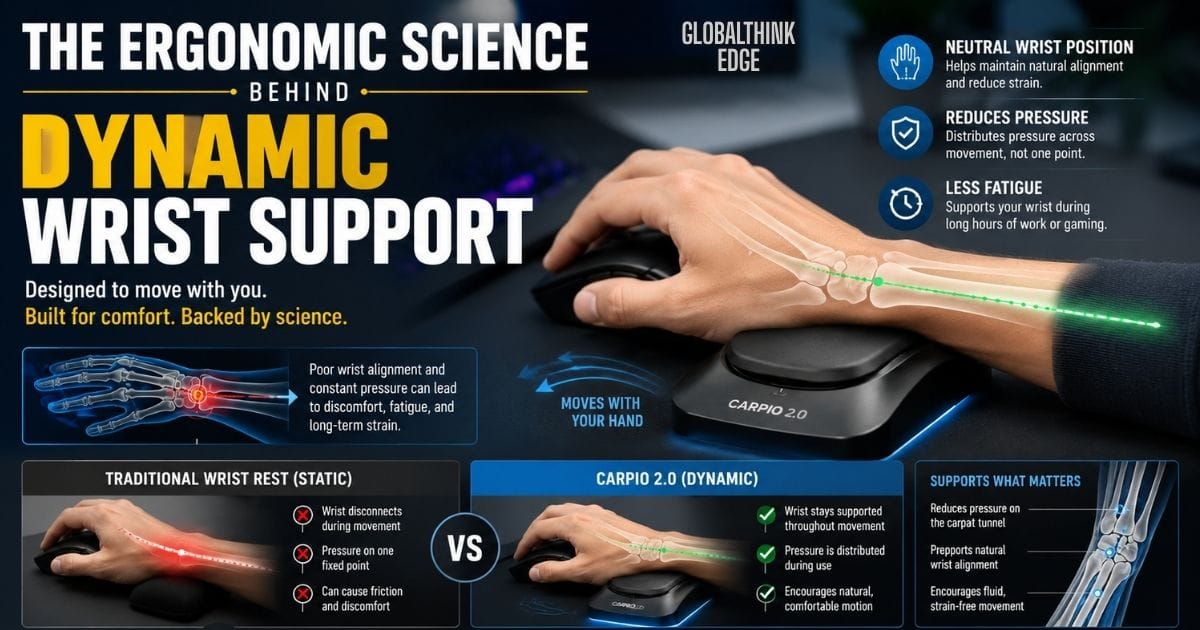
The Ergonomic Science Behind Dynamic Wrist Support
Understanding why the Carpio feels different requires looking at basic ergonomics.
When using a mouse for long periods, many people rest the underside of their wrist directly on the desk. Over time, this repeated pressure can contribute to discomfort, especially when combined with awkward wrist angles or poor posture.
Traditional wrist rests mainly provide cushioning. While that can improve comfort in some situations, fixed wrist rests may also encourage users to pivot their hand from one point, increasing stress during repetitive movements.
The Carpio attempts to solve this problem differently.
Instead of locking the wrist in place, it promotes a neutral wrist position, allowing the forearm and hand to move together more naturally.
Its sliding base helps distribute pressure across movement instead of concentrating it on one location.
Although this ergonomic concept makes sense biomechanically, it is important to understand that no wrist rest can replace healthy work habits. Proper chair height, monitor positioning, keyboard placement, and regular breaks remain essential for reducing long-term strain.
For people experiencing persistent numbness, severe pain, or symptoms of carpal tunnel syndrome, professional medical advice should always take priority over any ergonomic accessory.
Premium Design That Balances Form and Function
One reason the Carpio stands out is its modern industrial design.
Unlike oversized wrist cushions that dominate a desk setup, the Carpio has a compact profile that blends naturally into minimalist workspaces.
Its construction combines rigid support with soft contact points, creating a balance between durability and comfort.
Some notable design characteristics include:
Lightweight construction for easy portability
Curved ergonomic profile that follows wrist anatomy
Smooth low-friction glide pads
Soft silicone wrist contact surface
Modern matte finish
Separate models for left- and right-handed users
Because it is small enough to fit into a laptop bag, many users carry it between home, the office, and shared workspaces without difficulty.
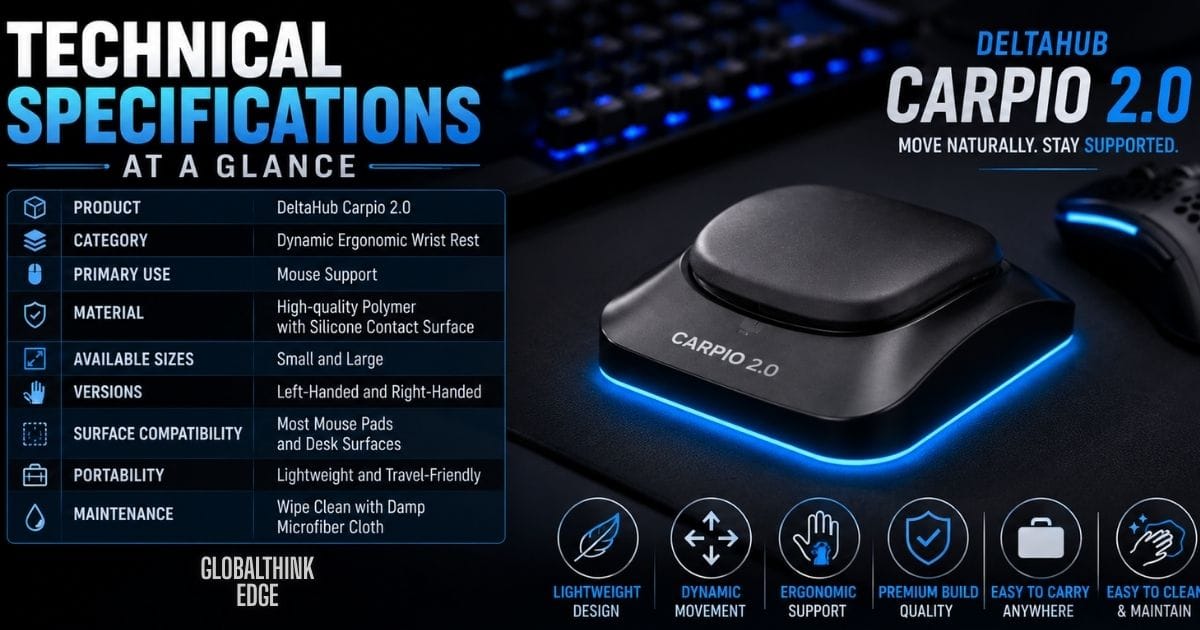
Technical Specifications at a Glance
Although specifications alone do not determine comfort, they provide a better understanding of the product before purchase.
| Specification | Details |
| Product | DeltaHub Carpio 2.0 |
| Category | Dynamic ergonomic wrist rest |
| Primary Use | Mouse support |
| Material | High-quality polymer with silicone contact surface |
| Available Sizes | Small and Large |
| Versions | Left-handed and Right-handed |
| Surface Compatibility | Most mouse pads and desk surfaces |
| Portability | Lightweight and travel-friendly |
| Maintenance | Wipe clean with a damp microfiber cloth |
These specifications make the Carpio suitable for users who frequently switch workstations or travel with their equipment.
Carpio 1.0 vs. Carpio 2.0: What’s Changed?
Many buyers wonder whether the newer version offers meaningful improvements over the original.
While both versions follow the same ergonomic concept, Carpio 2.0 introduces several refinements based on user feedback.
| Feature | Carpio 1.0 | Carpio 2.0 |
| Wrist Comfort | Good | Improved cushioning |
| Shape | Original design | More refined ergonomic profile |
| Wrist Stability | Good | Better wrist support during movement |
| Glide Performance | Smooth | Smoother and more consistent |
| Build Quality | Durable | Improved materials and finish |
| Long-Term Comfort | Good | Better suited for extended sessions |
These updates do not completely change how the product works, but they enhance the overall user experience, especially for people who spend six or more hours each day using a mouse.
Is the Carpio Comfortable for Different Types of Users?
Comfort depends heavily on how you use your computer.
For professionals who spend most of the day moving a mouse, the Carpio’s dynamic support can feel noticeably different from a traditional wrist rest.
It is particularly well suited for:
Office professionals managing spreadsheets and documents
Software developers writing code for extended periods
Graphic designers using precision tools
Video editors working on detailed timelines
Architects and engineers using CAD software
Gamers who require continuous mouse movement
Students attending long online classes or completing assignments
On the other hand, people who primarily use a laptop touchpad or spend very little time at a computer may not experience the same level of benefit.
The Carpio delivers the greatest value when repetitive mouse movement is part of your daily routine rather than an occasional task.
Key Takeaways So Far
Before evaluating real-world performance, a few important points stand out:
The Carpio is fundamentally different from traditional wrist rests because it moves with your hand instead of remaining fixed.
Its ergonomic design aims to encourage a more natural wrist position during extended mouse use.
BadSeed Tech’s review became popular because it offered a balanced assessment instead of focusing only on marketing claims.
Choosing the correct size and maintaining proper workstation ergonomics are just as important as the product itself.
Carpio 2.0 builds upon the original model with improvements in comfort, glide, and overall refinement.
Real-World Performance: Does the Carpio Actually Improve Comfort?
A product can have an impressive design on paper, but everyday performance is what ultimately determines its value. After understanding how the Carpio is engineered, the next question is whether it delivers noticeable benefits during regular computer use.
For many users, the biggest difference is not immediate comfort but reduced wrist fatigue over time. Instead of resting the wrist on a hard desk surface, the Carpio moves alongside your hand, helping maintain support during continuous mouse movements.
The experience may feel unusual during the first few days because most people are accustomed to fixed wrist rests. Once that adjustment period passes, the movement generally becomes more natural and less noticeable.
Results vary depending on your workstation, posture, and workload, but frequent computer users often report improvements in comfort during long sessions.

Performance Across Different Activities
The Carpio adapts well to a variety of tasks rather than serving only one type of user.
Office Productivity
People who spend hours working with spreadsheets, emails, and documents usually perform thousands of small mouse movements each day. The Carpio helps reduce repeated contact between the wrist and the desk, making long workdays feel less tiring.
Graphic Design and Creative Work
Designers frequently make detailed cursor movements in applications such as Adobe Photoshop, Illustrator, and Figma. The smooth gliding action allows precision work without constantly repositioning the wrist.
Programming
Software developers often alternate between typing and mouse use. Since the Carpio is designed primarily for mouse operation, it transitions naturally during coding sessions while keeping wrist support consistent.
Gaming
Fast-paced games require rapid and continuous mouse movement. Unlike traditional wrist pads that remain stationary, the Carpio follows your wrist, moving and feeling less restricted.
Its effectiveness, however, depends on individual grip style, mouse sensitivity, and desk setup.
Choosing the Right Size
One of the most common mistakes buyers make is choosing a size based on guesswork.
The Carpio is available in small and large versions because wrist support is only effective when it properly matches your hand dimensions.
How to Measure Your Hand
The simplest method is to measure the width of your palm without including the thumb. Compare this measurement with the official sizing recommendations before purchasing.
Selecting the correct size allows the support surface to sit comfortably beneath your wrist instead of pressing against the edges of your hand.
What Happens If the Size Is Wrong?
An incorrectly sized carpio may
Feel unstable during movement.
Reduce ergonomic support.
Cause unnecessary wrist pressure.
Make mouse control feel awkward.
Taking a few minutes to measure your hand can significantly improve the overall experience.
How to Use the Carpio Correctly
Although the Carpio is simple to use, correct positioning makes a noticeable difference.
Follow these basic steps:
1. Place the Carpio directly beneath your wrist.
2. Rest your forearm naturally on the desk.
3. Allow the Carpio to glide with your hand.
4. Avoid pressing excessive weight onto the support.
5. Keep your wrist in a neutral position while using the mouse.
Many first-time users mistakenly push down too hard or try to keep the Carpio perfectly still. The product performs best when it moves freely during normal mouse movement.

Common Mistakes That Reduce Its Effectiveness
Even a well-designed ergonomic accessory cannot compensate for poor habits.
Some of the most common mistakes include:
Buying the wrong size.
Sitting too low or too high.
Using the mouse too far from the body.
Bending the wrist excessively.
Gripping the mouse too tightly.
Ignoring regular movement breaks.
Expecting immediate results without an adjustment period.
Correcting these habits often improves comfort as much as the accessory itself.
Creating an Ergonomic Workstation
The Carpio works best as part of a properly arranged workspace rather than as a standalone solution.
For optimal comfort:
Keep your monitor at eye level.
Position your elbows at roughly 90 degrees.
Place the keyboard close enough to avoid reaching.
Keep the mouse beside the keyboard.
Sit with your feet flat on the floor.
Relax your shoulders instead of raising them.
Take short breaks every 45–60 minutes.
These simple adjustments can reduce overall strain and help you get the most from any ergonomic accessory.
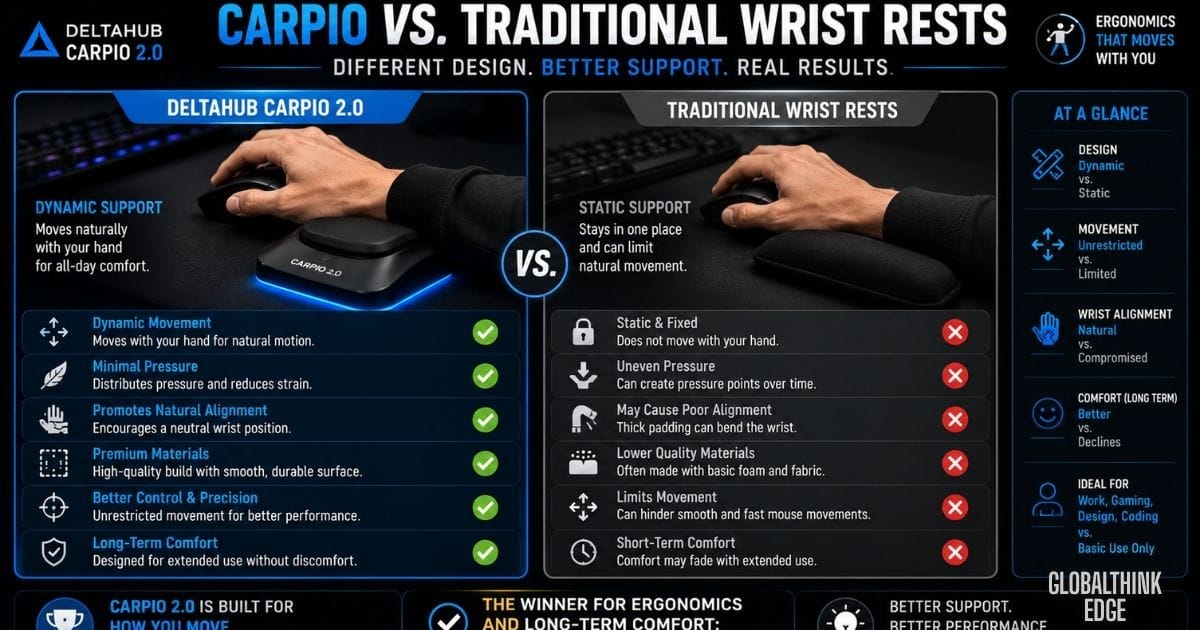
Carpio vs. Traditional Wrist Rests
Many buyers wonder whether the Carpio is simply another wrist cushion with a modern appearance.
In practice, the two products serve the same goal but use different approaches.
| Feature | DeltaHub Carpio | Traditional Wrist Rest |
| Movement | Moves with your hand | Stays fixed on the desk |
| Support Style | Dynamic | Static |
| Wrist Mobility | High | Limited |
| Desk Space | Compact | Larger footprint |
| Travel-Friendly | Yes | Usually not. |
| Learning Curve | Short adjustment period | Minimal |
| Long-Term Mouse Use | Better suited | Depends on material |
Neither option is universally better, but the Carpio is designed for users who spend extended periods actively moving a mouse.
How Does It Compare with Other Ergonomic Wrist Rests?
Several established brands also offer wrist support products.
| Product | Best For | Key Difference |
| DeltaHub Carpio | Dynamic mouse movement | Moves with the wrist |
| Logitech Wrist Rest | Keyboard typing | Stationary support |
| Kensington ErgoSoft | Office work | Gel cushioning |
| HyperX Wrist Rest | Gaming keyboards | Memory foam design |
| Glorious Wrist Pad | Mechanical keyboards | Large static support |
Unlike these alternatives, the Carpio focuses specifically on supporting the wrist during mouse movement rather than keyboard use.
Who Should Buy the Carpio?
The Carpio offers the greatest value to people who rely heavily on a mouse throughout the day.
It is an excellent choice for:
Office professionals.
Software developers.
Graphic designers.
Video editors.
CAD engineers.
Architects.
Competitive gamers.
Digital artists.
Students completing long computer-based projects.
If your daily routine involves several hours of continuous mouse use, the ergonomic benefits are likely to be more noticeable.
Who Might Not Need It?
Despite its strengths, the Carpio is not the ideal solution for everyone.
You may not benefit significantly if you:
Mostly use a laptop touchpad.
Spend very little time at a computer.
Expect it to treat medical conditions.
Frequently switch between mouse and touchscreen devices.
Already have a fully optimised ergonomic setup that causes no discomfort.
Understanding your own work habits is more important than simply following online recommendations.
Is It Worth the Price?
The Carpio costs more than many traditional wrist rests, which naturally raises questions about value.
Instead of judging the price alone, consider how often you’ll use it.
For someone working eight hours a day, an ergonomic accessory that improves comfort over several years may represent a worthwhile investment.
On the other hand, occasional computer users may struggle to justify the premium price.
The value ultimately depends on daily usage rather than the product’s specifications.

Value for Different Types of Users
| User Type | Value |
| Office Worker | Excellent |
| Programmer | Excellent |
| Graphic Designer | Excellent |
| Gamer | Very Good |
| Student | Good |
| Casual User | Fair |
Buying Tips Before You Place an Order
To ensure you receive the right product:
Buy from trusted retailers or the official manufacturer.
Measure your hand before selecting a size.
Confirm whether you need the left- or right-handed version.
Check the warranty and return policy.
Read recent customer reviews for long-term feedback.
Avoid suspiciously low prices that may indicate counterfeit products.
A few minutes of research before buying can help prevent disappointment later.
Long-Term Durability: Will the Carpio Last?
When buying an ergonomic accessory, comfort is only part of the equation. Durability also matters, especially if you plan to use it every day.
The DeltaHub Carpio 2.0 is built with a rigid polymer body and a soft silicone contact surface designed to withstand frequent use. Unlike foam wrist rests that may flatten over time or gel pads that can lose their shape, the Carpio maintains its structure because it relies on its ergonomic design rather than soft padding.
Under normal office or gaming conditions, users can expect the product to remain functional for years with basic care. The glide pads are engineered to move smoothly across compatible desk surfaces, while the silicone wrist contact area resists everyday wear better than many fabric-covered alternatives.
As with any desk accessory, longevity depends on how it is used and maintained. Excessive force, rough surfaces, or improper storage may shorten its lifespan.
Pros and Cons
Every ergonomic product has strengths and limitations. Looking at both sides provides a more balanced picture.
| Pros | Cons |
| Innovative dynamic wrist support | Costs more than basic wrist rests |
| Encourages natural mouse movement | It takes a few days to adjust |
| Lightweight and portable | Primarily designed for mouse use, not keyboard typing |
| Premium build quality | Benefits vary depending on workstation ergonomics |
| Available in multiple sizes | Not intended to treat medical conditions |
| Suitable for professional and gaming setups | Casual users may not notice significant improvements |
Overall Rating
Based on design, usability, and ergonomic value, the Carpio performs well across several important categories.
| Category | Rating |
| Ergonomic Design | 9.5/10 |
| Build Quality | 9.3/10 |
| Comfort | 9.2/10 |
| Ease of Use | 8.8/10 |
| Portability | 9.4/10 |
| Value for Money | 8.9/10 |
| Overall Score | 9.2/10 |
These ratings reflect the product’s intended purpose as a premium ergonomic accessory. Individual experiences may vary depending on work habits, posture, and personal comfort preferences.
Frequently Asked Questions
Is the Carpio only for gamers?
No. While gamers often appreciate its smooth movement, the Carpio is equally useful for office workers, programmers, designers, engineers, students, and anyone who spends long hours using a mouse.
Does it work with every mouse?
Yes. The Carpio supports your wrist rather than attaching to the mouse, making it compatible with virtually any wired or wireless mouse.
Can I use it on any mouse pad?
It works well on most cloth and hard mouse pads, as well as many smooth desk surfaces. Performance may vary slightly depending on surface texture and cleanliness.
Is it suitable for glass mouse pads?
The Carpio is primarily designed for common desk and mousepad surfaces. If you use a glass mouse pad, the gliding feel may differ, so checking user experiences with similar setups is worthwhile.
Can laptop users benefit from it?
Yes, provided you use an external mouse. If you mainly rely on a laptop’s built-in touchpad, the benefits will generally be limited.
Is there a left-handed version?
Yes. DeltaHub offers both left-handed and right-handed versions, allowing users to choose the model that matches their dominant hand.
How long does it take to get used to?
Most users become comfortable with the movement after several days of regular use. The adjustment period varies from person to person.
Can it prevent carpal tunnel syndrome?
The Carpio is designed to improve wrist support and comfort, but it should not be considered a medical device or a guaranteed method of preventing or treating carpal tunnel syndrome. Persistent pain or numbness should always be assessed by a qualified healthcare professional.
How often should it be cleaned?
A quick wipe every one to two weeks is usually enough for most users. More frequent cleaning may be helpful if you use it for extended hours each day.
Is the Carpio worth buying?
If you spend several hours each day working or gaming with a mouse, its ergonomic design may provide noticeable comfort benefits. For occasional computer users, a traditional wrist rest may be sufficient.
Final Verdict
The Badseed Tech Carpio review shows that the DeltaHub Carpio 2.0 is more than a standard wrist rest; it offers a dynamic ergonomic design that supports natural wrist movement during extended mouse use. While it isn’t a medical solution, it can significantly improve everyday comfort when paired with a properly adjusted workstation.
If you spend long hours working, gaming, or creating on a computer, the Badseed Tech Carpio is worth considering for its thoughtful design, premium build quality, and long-term usability. By choosing the right size and maintaining good ergonomic habits, you can make a more informed investment in your workspace comfort.
